
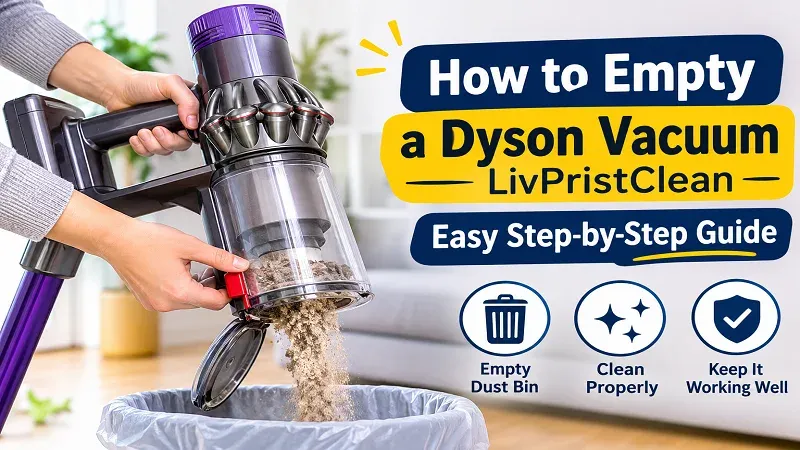
Dyson vacuum cleaners are popular because they offer strong suction, modern designs, and convenient cleaning features. However, like any vacuum cleaner, they need regular care to work properly. One of the most important maintenance tasks is emptying the dust bin. When the bin becomes too full, it can affect suction power and make cleaning less effective.
Learning how to empty a dyson vacuum livpristclean correctly can help you keep your vacuum cleaner in good condition. Although different Dyson models have slightly different designs, most follow a similar emptying process. The key is to remove the dust container carefully, empty it without creating a mess, and make sure it is securely attached again.
This guide explains the process step by step, along with useful safety tips, cleaning advice, and common mistakes to avoid.
1. Why Is It Important to Empty Your Dyson Vacuum?
Emptying your vacuum cleaner regularly is an essential part of home maintenance. Dust, hair, crumbs, and other small particles collect inside the dust bin during cleaning. If you allow this dirt to build up, it may reduce the machine’s performance.
Here are some reasons to empty the dust bin regularly:
- Better suction: A clean and properly emptied bin helps maintain effective airflow.
- Improved cleaning: The vacuum can collect dirt more efficiently when the bin is not overfilled.
- Better hygiene: Removing collected dust prevents unnecessary buildup inside the container.
- Less strain on the machine: Regular maintenance helps the vacuum operate as intended.
- Easier cleaning: Emptying the bin before it becomes packed with dirt makes the process simpler.
Most Dyson vacuum cleaners have a maximum fill line. It is a good idea to empty the container when the dirt reaches this line rather than waiting until it is completely full.
2. Prepare Your Vacuum Before Emptying It
Before you begin, take a moment to prepare the vacuum cleaner. This makes the process safer and helps prevent dust from spreading around your home.
Follow these simple steps:
- Turn off the vacuum cleaner.
- Disconnect the charger if your model is cordless and connected to one.
- If you have a corded model, unplug it from the electrical outlet.
- Move the vacuum to a suitable place for emptying.
- Find a rubbish bin large enough to hold the collected dust.
For people with dust allergies or sensitivity, emptying the vacuum outdoors can help reduce the amount of dust released inside the home. You may also choose to wear a dust mask.
Always check your model’s instructions if you are unsure how its dust container is released.
3. Locate the Dust Bin Release Mechanism
Dyson vacuum cleaners come in several styles, including cordless stick models, upright models, and cylinder models. Their dust containers may look different, but most have a release button, lever, or mechanism.
On many cordless stick models, the dust bin is attached to the main body of the vacuum. You may find a red release lever near the handle or dust container.
On some upright models, the dust bin can be removed by pressing a button near the top or side of the container.
Take a close look at your vacuum before pulling anything. Do not force the container if it does not move easily. The release mechanism should allow it to come away without excessive pressure.
Understanding the location of the release button is an important part of learning how to empty a dyson vacuum livpristclean without damaging the machine.
4. Remove the Dust Container Carefully
Once you have located the release mechanism, you can remove the dust container.
For many cordless Dyson models, the process is straightforward:
- Hold the vacuum securely.
- Press or pull the dust bin release control as directed for your model.
- Slide or lift the container away from the main body if the design requires it.
- Keep the container upright while moving it toward the rubbish bin.
Some models allow you to empty the dust bin while it remains attached to the vacuum. Others require you to remove the container first.
Avoid twisting or pulling parts that do not appear designed to move. If the container feels stuck, check the model instructions rather than applying extra force.
5. Empty the Dust Bin Into a Rubbish Bag
After removing the container, hold it over a rubbish bin or waste bag. Make sure the opening is positioned inside the bin to prevent dust from falling onto the floor.
Many Dyson vacuum cleaners use a hygienic emptying mechanism. Depending on the model, you may need to push a lever or slide a release control to open the bottom of the container.
Follow these general steps:
- Position the dust bin directly over the rubbish bag.
- Operate the release mechanism.
- Allow the dirt and debris to fall out.
- Gently shake the container only if necessary and permitted by the manufacturer’s instructions.
- Close the bottom flap securely after emptying.
Hair and fibres can sometimes become caught around the internal parts of the container. Remove visible debris carefully, but avoid using sharp objects that could scratch or damage the plastic.
6. Check for Stuck Dirt and Hair
Sometimes, emptying the dust bin does not remove every particle. Long hair, pet fur, and larger pieces of debris may become trapped around the opening or inside the container.
After emptying, inspect the dust bin carefully. If you notice stuck material, remove it gently with your fingers or a soft, dry cloth.
Do not push objects deep into the container. This could damage internal components or move dirt into areas that are difficult to clean.
If you have pets, check the dust bin more frequently because fur can collect quickly. Regular inspection also makes it easier to notice unusual dirt buildup.
7. Clean the Dust Container When Needed
Emptying the dust bin and washing it are two different maintenance tasks. You do not need to wash the container every time you empty it.
However, occasional cleaning can remove fine dust and dirt that remain on the inside surfaces.
Before washing any part, check your Dyson model’s care instructions. Some dust containers can be removed and washed, while other components must remain dry.
If your model allows the bin to be washed:
- Remove the dust container according to the instructions.
- Separate any parts that are approved for washing.
- Rinse the washable container with cold or lukewarm water, as directed.
- Avoid using detergents or cleaning chemicals unless the manufacturer specifically permits them.
- Allow the container to dry completely before putting it back.
Never put a wet dust container into the vacuum. Moisture can damage the machine and may affect its performance.
8. Reattach the Dust Bin Properly
Once the container is empty and completely dry if it has been washed, it is time to put it back.
Line up the container with its original position on the vacuum cleaner. Slide or place it into position according to the model’s design.
Press gently until it locks into place. You may hear or feel a click when the container is properly secured.
Check that the bottom flap is closed and that the dust bin does not move loosely. If it is not attached correctly, the vacuum may not work as expected.
Do not switch on the machine until you are confident that all parts are fitted properly.
9. How Often Should You Empty a Dyson Vacuum?
The right emptying schedule depends on how often you use your vacuum and how much dirt it collects.
For example, a small household with hard floors may not fill the dust bin as quickly as a busy home with pets and carpets.
Here are some general guidelines:
- Light use: Check the dust bin after a few cleaning sessions.
- Regular household cleaning: Inspect it after each major cleaning session.
- Homes with pets: Check the container frequently because pet hair takes up space.
- Heavy cleaning: Empty the bin whenever dirt reaches the maximum fill line.
The best approach is to check the dust container regularly instead of following a strict schedule. If it is nearly full, empty it before starting another cleaning session.
10. Common Mistakes to Avoid
Although emptying a Dyson vacuum is usually simple, a few mistakes can cause problems.
Waiting Until the Bin Is Completely Full
A completely packed dust bin can make emptying more difficult. It may also affect airflow and cleaning performance. Try to empty it when dirt reaches the recommended maximum level.
Pulling the Container Too Hard
Forcing the dust bin can damage its clips or release mechanism. Always use the correct button or lever.
Washing Parts That Should Stay Dry
Not every part of a vacuum cleaner is washable. Keep the motor, electrical components, and other non-washable parts away from water.
Reinstalling a Wet Container
A wet dust bin should never be placed back into the machine. Let washable parts dry completely before reassembly.
Forgetting to Close the Bottom Flap
If the flap is not properly closed, dust may escape during the next cleaning session. Always check it before using the vacuum again.
Avoiding these mistakes will make how to empty a dyson vacuum livpristclean a safer and easier maintenance task.
11. Extra Tips for Keeping Your Dyson Vacuum Clean
Emptying the dust bin is only one part of proper vacuum maintenance. A few additional habits can help keep your machine working well.
Check the filters: Dyson vacuum filters need regular care. Follow the cleaning and replacement instructions for your specific model.
Inspect the brush bar: Hair and threads can become wrapped around the brush bar. Remove trapped material according to the manufacturer’s guidance.
Check for blockages: If suction becomes weak, inspect accessible airways and attachments for trapped debris.
Clean the exterior: Wipe the outside of the vacuum with a soft, dry cloth when needed.
Store it properly: Keep the vacuum in a dry place where it is protected from moisture and accidental damage.
These simple habits can help prevent common cleaning problems and keep your vacuum ready for everyday use.
12. Frequently Asked Questions
Can I Empty My Dyson Vacuum Without Removing the Bin?
Yes, some Dyson models allow you to empty the dust container while it is still attached to the machine. Other models require you to remove it first. Check the instructions for your specific vacuum.
Should I Empty My Dyson After Every Use?
You do not always need to empty it after every short cleaning session. However, you should empty it whenever the dirt reaches the maximum fill line.
Can I Wash the Dyson Dust Bin?
Some Dyson dust containers can be washed, but this depends on the model. Check the manufacturer’s instructions before using water. Always let washable parts dry completely.
Why Is My Dyson Vacuum Not Suctioning Properly?
A full dust bin, dirty filter, blocked airway, or tangled brush bar may affect suction. Check these areas and follow the maintenance instructions for your model.
Can I Use Soap to Clean the Dust Container?
Do not use soap or cleaning products unless the instructions for your model specifically allow them. Water alone may be recommended for certain washable parts.
Conclusion
Keeping your Dyson vacuum clean does not have to be difficult. Emptying the dust bin regularly helps maintain airflow, supports effective cleaning, and prevents dirt from building up inside the container. The process usually involves switching off the machine, locating the release mechanism, opening the dust bin over a rubbish bag, and securing it properly afterward.
By following the correct steps and checking your model’s instructions, you can complete this task safely and confidently. Remember to inspect filters, remove trapped hair, and clean washable parts only when needed.
With a little regular care, your vacuum cleaner can remain ready for everyday cleaning. Learning how to empty a dyson vacuum livpristclean is a simple but useful habit that supports better home maintenance and helps you get the most from your cleaning equipment.